RileyLink Phone ToughCase
by achkars
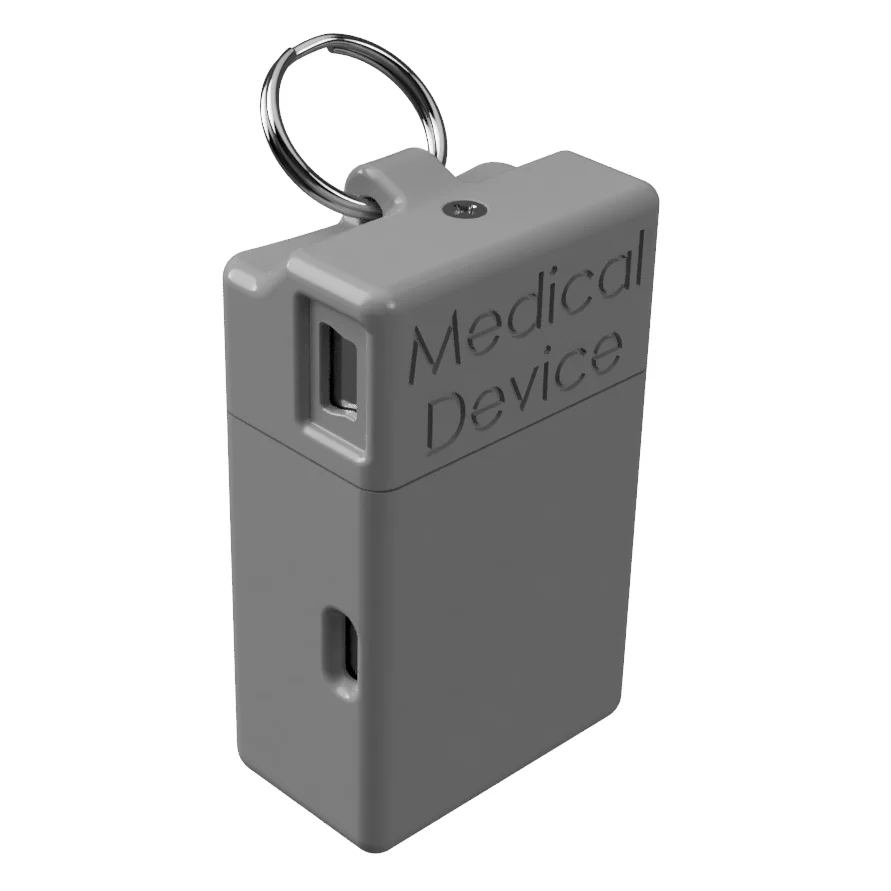
This is a case for the RileyLink. It was designed to be mounted on you existing phone case using 7 small screws (you will need to drill 7 holes in the case). It comes in the original toughcase (for medtronic 916 MHz RL) and Omni (for omnipod 433MHz RL). Both models come either plain or with a "Medical Device" logo. Assembly Video: https://youtu.be/zjlRRF2pwE4 It includes the following components: RileyLink Phone Case - RileyLink Phone ToughCase v24.stl (3D printed) Light Pipes(10 units per print, only 5 are required) and selector switch (2 units per print, only 1 is required) - LightPipex10+SW.stl (3D printed - translucent) OR RileyLink Phone Case with holes for light pipes capped - RileyLink Phone ToughCase NoPipes v18.stl (3D printed) Screws to fasten to your phone case - 7x Flat Head M2 X 0.4 mm pitch 6mm long (hardware) Case was printed in SLS Nylon (I have mine in glass filled nylon for abrasion resistance) Light pipes were printed in SLA translucent resin **The case can be printed without holes for light pipes if you don't want to use them. The LED holes are covered with a thinner material which should let more light out and make it easier to see the light through the nylon. The last file is a printable drilling template. Make sure to print it 1:1. Confirm the dimensions by measuring the reference 10mm or 1in markings on the drawing. Assembly Cut 5 lightpipes and switch from scaffolding Insert in the case, cut the pins flush to the inside surface (so they don't touch/damage the PCB) Insert LiPo battery and PCB in the case Drill 7 holes in your case for mounting. If possible, use a countersink drill bit on the inside of the case for the screws to be flush. Print Settings Rafts: No Supports: No Resolution: 0.2mm Notes: SLS Glass filled Nylon12 SLA Resin Category: Electronics
Also available on
Similar models